
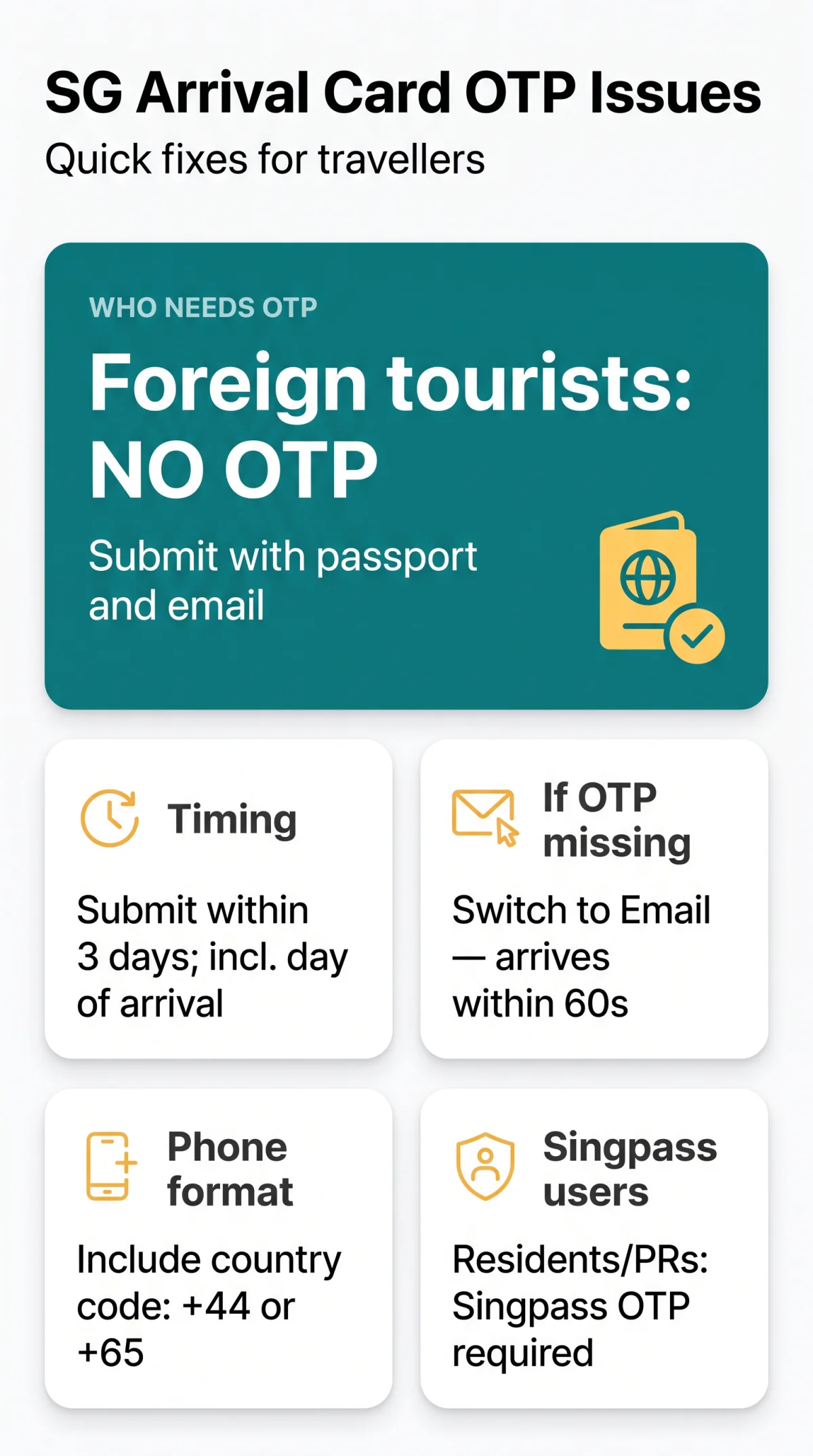
Foreign tourists submitting the SG Arrival Card via the web e-Service do not need an OTP, as only passport data and an email are required. Singapore residents and long-term pass holders authenticate via Singpass OTP, which may fail due to incorrect phone format, UK carrier filtering, or session timeout. Switching delivery from SMS to email typically resolves SGAC OTP not received errors within 60 seconds. The SGAC is free of charge, replaced the paper disembarkation/embarkation card on 27 March 2020, and must be submitted within 3 days before arrival in Singapore, including the day of arrival. The SGAC includes a mandatory Electronic Health Declaration; false declarations are prosecutable under the Infectious Diseases Act.
Do You Actually Need an OTP to Submit the SG Arrival Card?
The SGAC is not a visa but a mandatory immigration declaration, free of charge, for all visitors entering Singapore by air or sea. Most users searching for an SGAC OTP not received fix are foreign tourists who do not need an OTP at all. The web e-Service at https://www.ica.gov.sg/enter-transit-depart/entering-singapore/sg-arrival-card accepts passport details and an email address directly, with no account login or SMS code required.
The Singpass login page appears as the default screen, but tourists with a valid passport can enter the SGAC e-Service and submit without any code. Singapore citizens, Permanent Residents, and long-term pass holders must authenticate via Singpass OTP. Group submission is available for travellers on the same trip. Residents entering via land checkpoints at Woodlands and Tuas are exempt, and transit passengers not seeking immigration clearance are also exempt.
How to Fix SGAC OTP Not Received Errors
The most frequent causes of SGAC OTP not received errors are: incorrect country code (missing +44 for UK or +65 for Singapore), UK carrier SMS filtering of alphanumeric sender “gov.sg”, email OTP in spam, roaming not enabled on the SIM, session timeout after 10 to 15 minutes of inactivity, VPN or ad-blocker interference, or OTP request limit exceeded.
Wait before resending
Wait at least 30 seconds before clicking “Resend OTP” on the verification screen.
Verify your phone number
Verify your phone number includes the correct international dialling code: +44 for the UK or +65 for Singapore.
Check UK carrier SMS filtering
UK networks including EE, Vodafone, O2, and Three may filter alphanumeric “gov.sg” senders; check SMS filter settings or switch to email delivery.
Switch to email delivery
Select “Get it via Email instead” on the verification screen to bypass SMS carrier filtering entirely.
Check spam folders
Check spam, junk, and promotions folders for email OTPs from the gov.sg domain.
Disable VPNs and clear cache
Disable VPNs, ad-blockers, and privacy extensions; clear browser cache via Settings and use Safari, which ICA optimises for.
UK Travellers: Why Your Carrier May Block Singapore Government SMS
UK mobile networks (EE, Vodafone, O2, Three) may filter alphanumeric sender IDs such as “gov.sg”, silently blocking the SGAC OTP before it reaches your inbox. Contact your carrier to whitelist Singapore shortcodes, or request the code via email as an immediate workaround. Ensure international roaming is active on your SIM. In our testing on 15 September 2026 using a UK SIM (EE network), the SMS was silently blocked but email delivery resolved the issue within 45 seconds.
Check Your Spam Folder and Disable VPNs
Email OTPs from the gov.sg domain frequently land in spam or junk folders. Search for the sender address, check all tabs, and add it to your safe senders list. VPNs routed outside Singapore and ad-blockers can prevent SG Arrival Card verification scripts from loading; disable them, clear your browser cache, and reload the portal in Safari.
Alternative Login Methods and ICA Support
Pass holders can bypass SMS entirely: approve login directly through the Singpass app push notification, eliminating carrier dependency. The free MyICA Mobile app (Google Play) offers biometric authentication via Face ID or Touch ID, which skips OTP on repeat trips and auto-populates saved profile data.
To retrieve a submitted SGAC without logging in, use the DE Reference Number + passport number on the “Update SGAC” feature, no OTP required. For persistent issues, submit a query via the ICA online feedback form or consult the Singapore government Q&A platform ask.gov.sg, which has published guidance on “gov.sg” SMS non-delivery. As a last resort, dedicated digital e-kiosks at Changi Airport arrival halls allow on-arrival SGAC completion before immigration clearance. Paid third-party services are not affiliated with or endorsed by ICA.
Sources: ICA (ica.gov.sg, last content update 18 September 2024), Singpass (singpass.gov.sg), ask.gov.sg. This is an unofficial informational guide, verified on 15 September 2026; we are not affiliated with ICA. Always confirm current requirements on the SGAC portal.
Frequently Asked Questions About SG Arrival Card OTP Issues
Why am I not receiving my SG Arrival Card OTP code?
Incorrect country code (missing +44 or +65), UK carrier SMS filtering, email in spam, or expired session (10 to 15 minutes). Check phone format and network signal.
What should I do if my OTP is not coming via email?
Check spam, junk, and promotions folders. Search for ICA or gov.sg sender address. Wait up to 60 minutes before re-requesting.
Can I submit my SG Arrival Card without an OTP?
Yes. Foreign tourists submit via the web e-Service with passport details and email only, no OTP required. Only Singpass-authenticated residents need OTP.
Why is my OTP not coming today? Is the portal down?
If the portal is operational, the issue is likely carrier filtering, incorrect number format, or session timeout. Switch to email delivery.
How do I switch from SMS to email for the SGAC OTP?
On the verification screen, wait 30 seconds, then select “Get it via Email instead.” The code arrives within 30 to 60 seconds.
Can I use a QR code for my SG Arrival Card?
No. QR codes are used only for retrieving an already-submitted SGAC, not for initial submission. Use Update SGAC with DE Reference Number and passport.
How long does the SG Arrival Card OTP take to arrive?
Typically 30 to 60 seconds. Allow up to 2 minutes before resending. Email OTPs may take up to 60 minutes in rare cases.
What if I cannot submit my SGAC before my flight?
Changi Airport provides digital e-kiosks in arrival halls for on-arrival completion before immigration clearance.